
Betaflight Rates on a Switch
Switch your rates in-flight with a switch on your remote!
Intro
It can be very useful to be able to adjust your rates in-flight or before taking off, without having to connect to Betaflight, especially if like me, you have that one quad that you use for both indoor and outdoor flights.
In this article, I’ll guide you through the process of setting up Rate Profiles on your Betaflight flight controller.
Prerequisites
- Drone with Betaflight firmware
- Betaflight Configurator
- A switch on your controller mapped to a spare AUX channel
What are Betaflight Rateprofiles?
Rateprofiles in Betaflight are like different pages where rate values can be saved independently. It saves everything you can see on the Rateprofile Settings screen, including the throttle limit and expo, as well as the rates.
The active profile can be switched manually from within Betaflight, however that is quite inconvenient in the field, so I will guide you through how to map it to a switch on your remote controller.
Backing up your Configuration
Caution
Before proceeding, backup your Betaflight configuration.
It is easy to mess up the settings, and it is always good to have a backup to restore from if necessary.
This can be easily done by going to:
- Presets tab
- Save backup
- Select a location to save the file


This way, if you mess up the configuration of the flight controller while following this guide, it will be easy to restore back by simply clicking Load Backup and selecting the .txt file.
Setting up multiple rateprofiles
Next, let’s set up multiple rate profiles. This is quite easy!
Navigate to the PID Tuning tab (if you can’t see it, enable Expert Mode on the top right), then go to Rateprofile Settings.
You’re probably already familiar with this tab, it lets you customize your rates, expo curves, and throttle limit. But did you know that you can have different rates on different profiles?
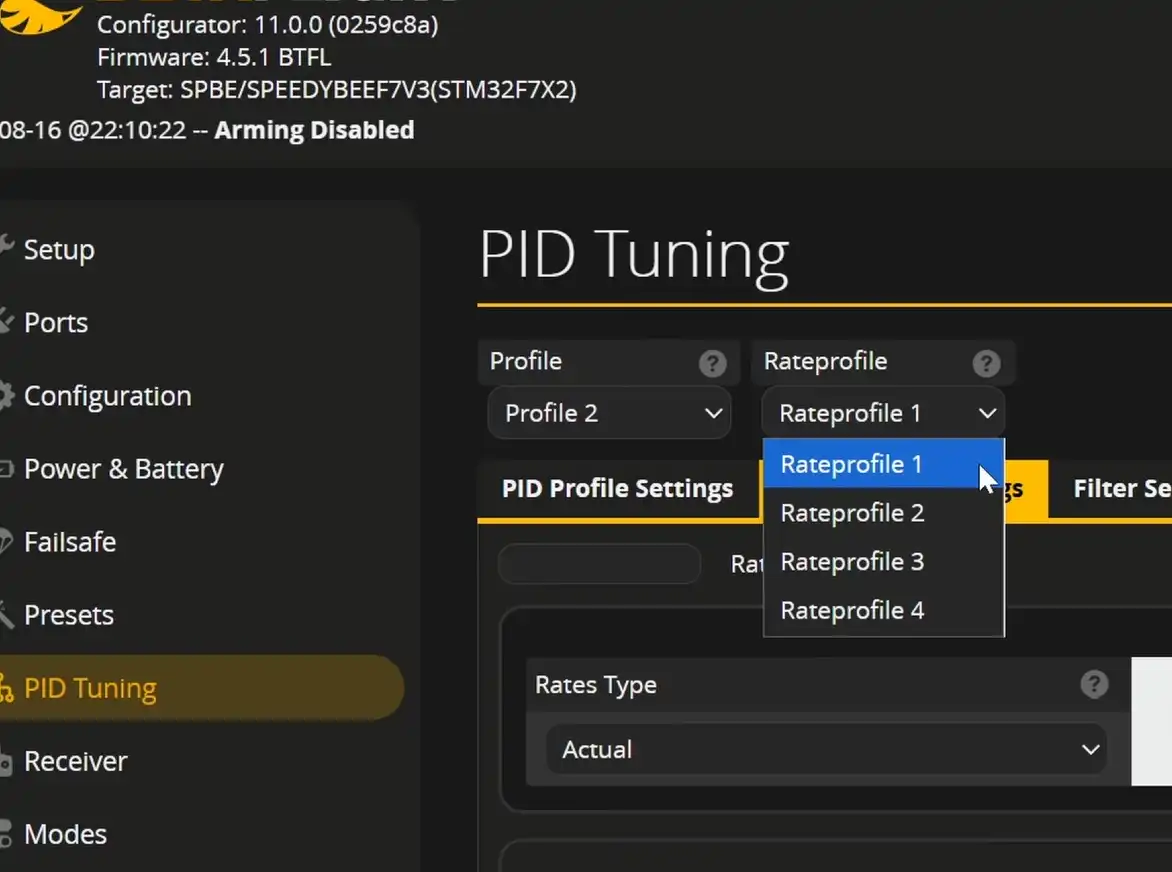
Let’s setup a second profile! Adjust your rates if necessary (probably they’ll already be how you expect them to), save on the bottom right, then on the top right, switch to “Rateprofile 2”, you’ll notice all the settings reset to the defaults - now tweak the rates for the second profile, don’t forget to save afterwards. It is possible to even add a 3rd profile if you wish, just don’t forget to save before switching to another profile.
You should also set a name to each profile in the top left, it will come in handy later.

Once they’re all set up, you can switch between them in the Betaflight Configurator, or if you have the Betaflight Lua Script, that can also be used to switch between the profiles easily.
But let’s go one step further!
Switching Rateprofiles using a switch
Let’s face it - it’s quite inconvenient to switch rates by connecting to Betaflight all the time, or even using the Lua script on your remote, because you can’t do that in flight. So let’s tie the Rateprofile to a switch!
This is quite simple to do.
First, you’ll need a switch mapped to an AUX channel. This article doesn’t go into the details on how to to that, it must be done in the remote controller.

Then, go to the Receiver tab in Betaflight, and note which AUX channel is tied to your switch - this will be important in the next step.
Next, go to Adjustments tab, find the first line that is unused, and enable it. Set when channel and via channel to the AUX channel that your switch is on. Drag the range across the whole channel, and set then apply to Rate Profile Selection.
It should look something like this:

Now you can flip the switch to swap the configured rateprofiles!
Rateprofile names in the OSD
Remember I mentioned naming profiles earlier? This is because it is possible to display the current active rateprofile in the OSD.
To do so, go to the OSD tab, and find Profile: rate profile name, enable it, and place it wherever you want on the OSD. Don’t forget to save.
Now you will be able to see which profile is active at any time simply by glancing at your OSD!

Help! I cannot switch the rateprofile in Betaflight
After setting up the adjustment to the AUX channel, the current rateprofile selected is depending on the switch position, so you will not be able to switch the rateprofile manually in Betaflight if you have configured the switch for rates. To actually configure your rates, connect your controller, adjust the rates, save, then flip the switch on your controller to go into the next profile, customize that one, save, and so on.